> ## Documentation Index
> Fetch the complete documentation index at: https://docs2.zenskar.com/llms.txt
> Use this file to discover all available pages before exploring further.

# Customer-facing portal

The customer-facing portal is designed to provide your customers complete information about their accounts. They can access historical data regarding invoices, payments, and entitlements.

> 🔜 Coming soon
>
> Work is in progress to add the following features to the customer portal:
>
> * reports
> * contracts
> * billing information
> * default payment methods
> * branding: logo and color options

## Accessing customer portal

* Use the left-side panel to navigate to the **Customers** page..

<Image align="center" className="border" border={true} src="https://files.readme.io/cc1fd51-Screenshot_from_2024-03-21_11-22-27.png" />

* Click on the user you are interested in to move to the customer-details page.
* Click on the kebab-menu located on the top-right corner, as shown in the image below.
* Click on the **View Customer Portal** option to view the customer portal.

<Image align="center" className="border" border={true} src="https://files.readme.io/d189497-Screenshot_from_2024-03-21_11-24-51.png" />

> 👍 Customer portal can be embedded in your website
>
> To help your customers to login and access the customer portal from your website, you can embed the customer portal in your website using an API provided by Zenskar.

## Customer portal features

### Invoices

All the invoices associated with a customer are shown here with the following details: **Invoice ID**, **Status**, **Invoice Total**, **Due Date**, **Amount Due**, **Billing Period**, and **Generated On**.

<Image align="center" className="border" border={true} src="https://files.readme.io/73a85e4-z-1.png" />

### Payments

Payments tab contains the history of transactions (for example, invoice payments, refunds).

<Image align="center" className="border" border={true} src="https://files.readme.io/82a7864-z-2.png" />

### Entitlements

Entitlements tab contains the list of entitlements associated with a customer.

<Image align="center" className="border" border={true} src="https://files.readme.io/8dfd1a7-z-3.png" />

* **Edit Profile**\
  Your customer can access their **Profile** page by clicking on the profile drop-down menu located at the top-right corner. They can view or edit their profile.

<Image align="center" className="border" border={true} src="https://files.readme.io/96c6d72-2024-03-21_13.28.06_staging-customer.zenskar.com_7a8492aaf31a.png" />

## Use Zenskar API to fetch customer-portal URL for a given customer

1. Get [your API key](https://zenskar.readme.io/reference/authentication) to authenticate your API requests.
2. Make an `HTTP` `POST`API request with the following details:

<Table align={["left","left"]}>
  <thead>
    <tr>
      <th style={{ textAlign: "left" }}>
        Parameter
      </th>

      <th style={{ textAlign: "left" }}>
        Value
      </th>
    </tr>
  </thead>

  <tbody>
    <tr>
      <td style={{ textAlign: "left" }}>
        URL
      </td>

      <td style={{ textAlign: "left" }}>
        `https://api.zenskar.com/customer/session`
      </td>
    </tr>

    <tr>
      <td style={{ textAlign: "left" }}>
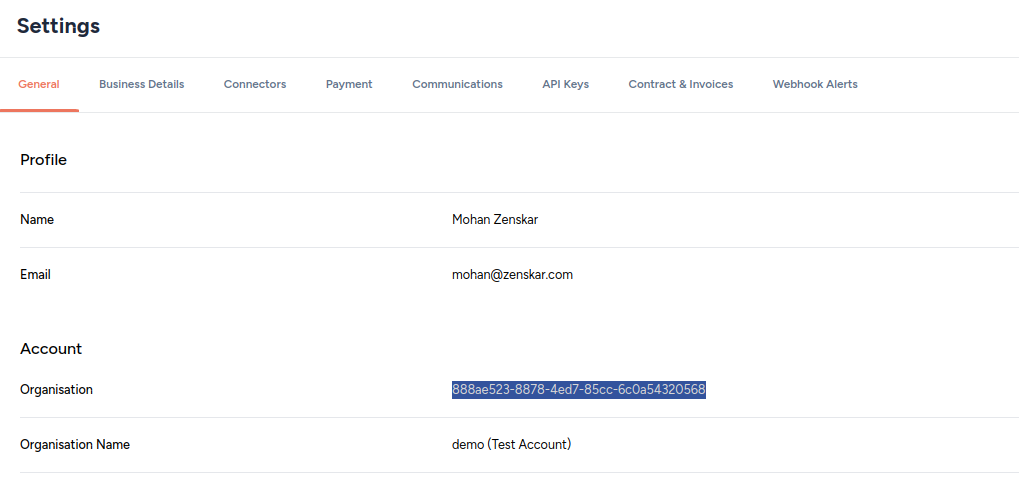
        `organisation`
      </td>

      <td style={{ textAlign: "left" }}>
        Navigate to **Settings** > **General**.\
        ![](https://files.readme.io/2e6e2ff-Screenshot_from_2024-05-10_11-49-07.png)
      </td>
    </tr>

    <tr>
      <td style={{ textAlign: "left" }}>
        `X-API-KEY`
      </td>

      <td style={{ textAlign: "left" }}>
        Get [your API key](https://zenskar.readme.io/reference/authentication)  to authenticate your API requests.
      </td>
    </tr>

    <tr>
      <td style={{ textAlign: "left" }}>
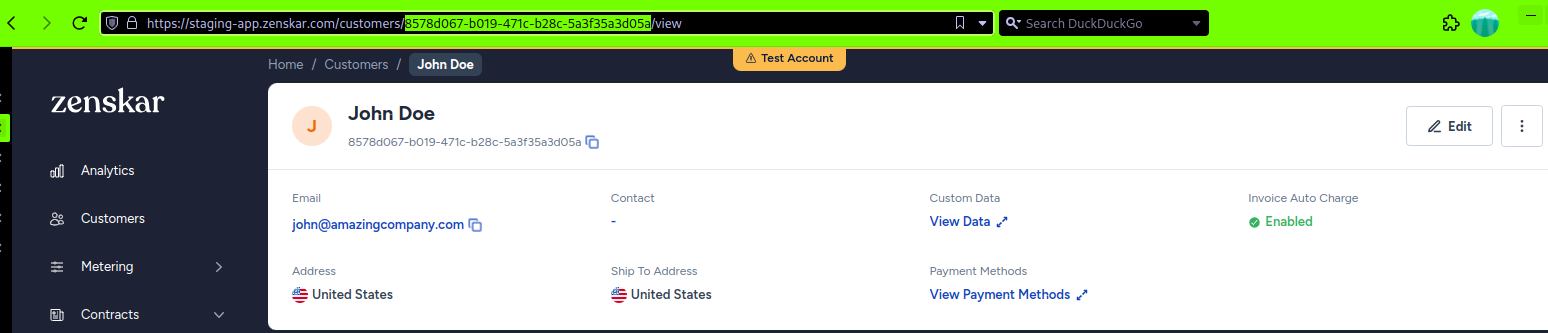
        `customer_id`
      </td>

      <td style={{ textAlign: "left" }}>
        1\. Click on **Customers** in the left sidebar.\
        2\. Click on the row containing the customer you are interested in.\
        3\. On the page that displays the customer's details, copy the UUID from the URL, as shown below:\
        ![](https://files.readme.io/e7a6b18-Screenshot_from_2024-05-10_12-04-40.png)
      </td>
    </tr>

    <tr>
      <td style={{ textAlign: "left" }}>
        `return_url`
      </td>

      <td style={{ textAlign: "left" }}>
        This is the URL where your customers will be *returned to* when they click on your logo on the customer portal. In the example below, the `return_url` is `https://zenskar.com`.
      </td>
    </tr>

    <tr>
      <td style={{ textAlign: "left" }}>
        `idle_timeout`
      </td>

      <td style={{ textAlign: "left" }}>
        Duration of inactivity, in seconds, after which the customer portal session will expire. In the example below, `idle_timeout` is `86400`seconds (24 hours).
      </td>
    </tr>
  </tbody>
</Table>

A sample API request made using the [cURL](https://curl.se/docs/manpage.html) tool is shown below:

```curl theme={null}
curl --location --request POST 'https://api.zenskar.com/customer/session' \
-H 'organisation: c3b949f8-633f-4fec-9105-e2b3a4d06b98' \
-H 'X-API-KEY: <your-api-key>' \
-H 'Content-Type: application/json' \
--data-raw '{"customer_id":"063f8b97-f795-4f0b-89b4-88b114c83f44","return_url":"https://zenskar.com","idle_timeout":86400}'
```

A sample response is shown below:

```
{
    "redirect_url": "https://customer.zenskar.com/session/c3b949f8-633f-4fec-9105-e2b3a4d06b98_063f8b97-f795-4f0b-89b4-88b114c83f44_xW7oVSJj3tIkmHX5XjSybRsxTvOqoHWNhR0Cf-Pe0aI?return_url=https://zenskar.com"
}
```
