

When to use this
- Your usage events are already stored in a production database or warehouse.
- You want to avoid data duplication or delay.
- You need real-time visibility or direct query-based control over what is ingested.
Supported data sources
You can connect any of the following sources using a remote query:- PostgreSQL
- MySQL
- Amazon Redshift
- Snowflake
- BigQuery
- Microsoft SQL Server
Prerequisites
- A database user with read-only access.
- IP allowlisting or network access permissions (e.g., via VPC peering or SSH tunneling).
How to set up a remote query source
- In Zenskar, go to Usage > Data Sources.
- Click + ADD DATA SOURCE.
- Choose your source type (e.g., PostgreSQL, Snowflake).
-
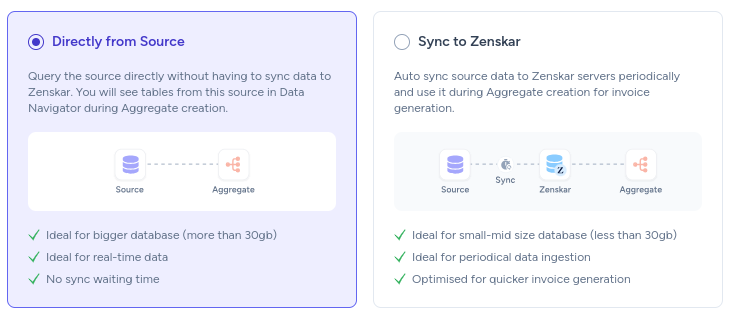
Select Directly from source under the Source Access section.
-
Fill in the connection details under the Source Config section:
- Host, port, database name, username/password
- SSL or SSH settings as needed
- Save and activate the source. Zenskar will schedule queries at regular intervals.
What happens next
- Zenskar executes the configured query on your database.
- The query results are processed and shown in your ingestion table.
- You can build billable metrics from this data using the visual or SQL metric builder.
Pros and cons
| Pros | Cons |
|---|---|
| Fresh data with no duplication | Requires reliable network access |
| Flexible querying and filtering | May affect source performance if not optimized |
| No need to transfer large datasets | Needs SQL familiarity and ops involvement |
Best practices
- Use incremental queries with a
WHERE timestamp > last_run_timeclause. - Query a read replica instead of your production DB if available.
- Limit columns to only what’s needed for metering and invoicing.
- Monitor and optimize long-running queries.