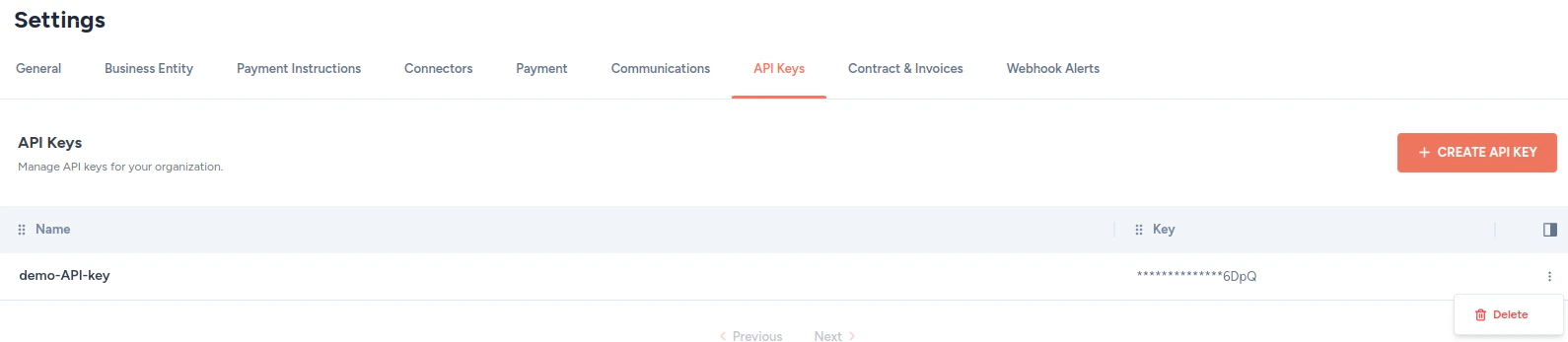
Zenskar allows you to create API keys that can be used for authentication. A few scenarios where API key can be used for authentication are listed below:Documentation Index
Fetch the complete documentation index at: https://docs2.zenskar.com/llms.txt
Use this file to discover all available pages before exploring further.
- You can authenticate an API request to Zenskar by adding API key to the
x-api-keyrequest header. - Third-party software such as Salesforce require Zenskar’s API key for integration.
Create an API key
- In the side panel, click on the drop-up menu with your name.
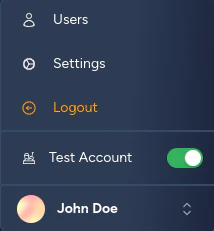
- Click on the Settings option on the drop-up menu.
- On the Settings page, navigate to the API Keys tab.
- Click on the + CREATE API KEY button.
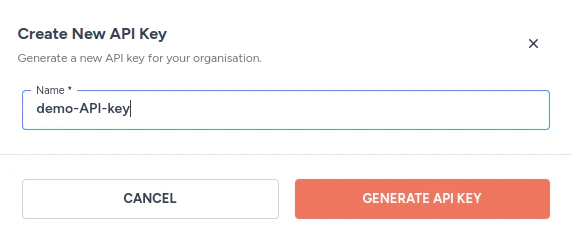
- Enter a descriptive name for the key and click on the GENERATE API KEY button.
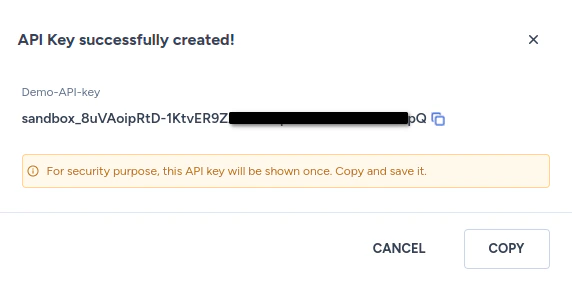
- Click on the Copy button. Save the API key somewhere safe. The API key cannot be viewed or copied after this step.
Delete an API key
- In the side panel, click on the drop-up menu with your name.
- Click on the Settings option on the drop-up menu.
- On the Settings page, navigate to the API Keys tab.
- Click on the kebab menu on the row containing the API key you wish to delete, and select the Delete option.