
The customer-facing portal gives your customers a self-serve view of their account — invoices, payments, entitlements, contracts, and pricing. You embed it in your product or link to it directly.Documentation Index
Fetch the complete documentation index at: https://docs2.zenskar.com/llms.txt
Use this file to discover all available pages before exploring further.
The following features are in progress and not yet available in the portal: reports, billing information management, and default payment methods.
What customers see
Once they land on the portal, customers can access:| Tab | Contents |
|---|---|
| Invoices | Invoice ID, status, total, due date, amount due, billing period, generated date |
| Payments | History of transactions including invoice payments and refunds |
| Entitlements | Feature or usage limits granted under their contract |
| Profile | Editable name, email, phone number, and address |
Integration overview
Each time a customer needs access, generate a session URL from your backend and send them to it. Session URLs are short-lived and scoped to a single customer. Generate them server-side — this requires your API key.Step 1: Generate a session for a customer
| Parameter | Required | Description |
|---|---|---|
customer_id | Yes | The Zenskar UUID of the customer. |
return_url | Yes | Where to send the customer when they click your logo or when the session expires. |
idle_timeout | No | Session expiry in seconds after inactivity. Default: 3600 (1 hour). |
is_guest_session | No | Set true to create a session without a specific customer (e.g. for a signup or checkout flow). Mutually exclusive with customer_id. |
redirect_url to send the customer to the portal. Use session_token if you need to make customer portal API calls directly from your own backend on behalf of the customer.
Step 2: Redirect or embed
Redirect (recommended): Send the customer toredirect_url with a standard browser redirect. The portal opens as a full-page experience.
Embed via iframe: Set the src of an iframe to redirect_url. The portal fits within your existing app layout.
How sessions work
- Each session is scoped to a single customer and organisation.
- Generating a new session for a customer invalidates any existing active session for that customer.
- Sessions auto-extend when less than 50% of the idle timeout remains, so an active customer is not suddenly logged out.
- Once expired, the customer is redirected to
return_url.
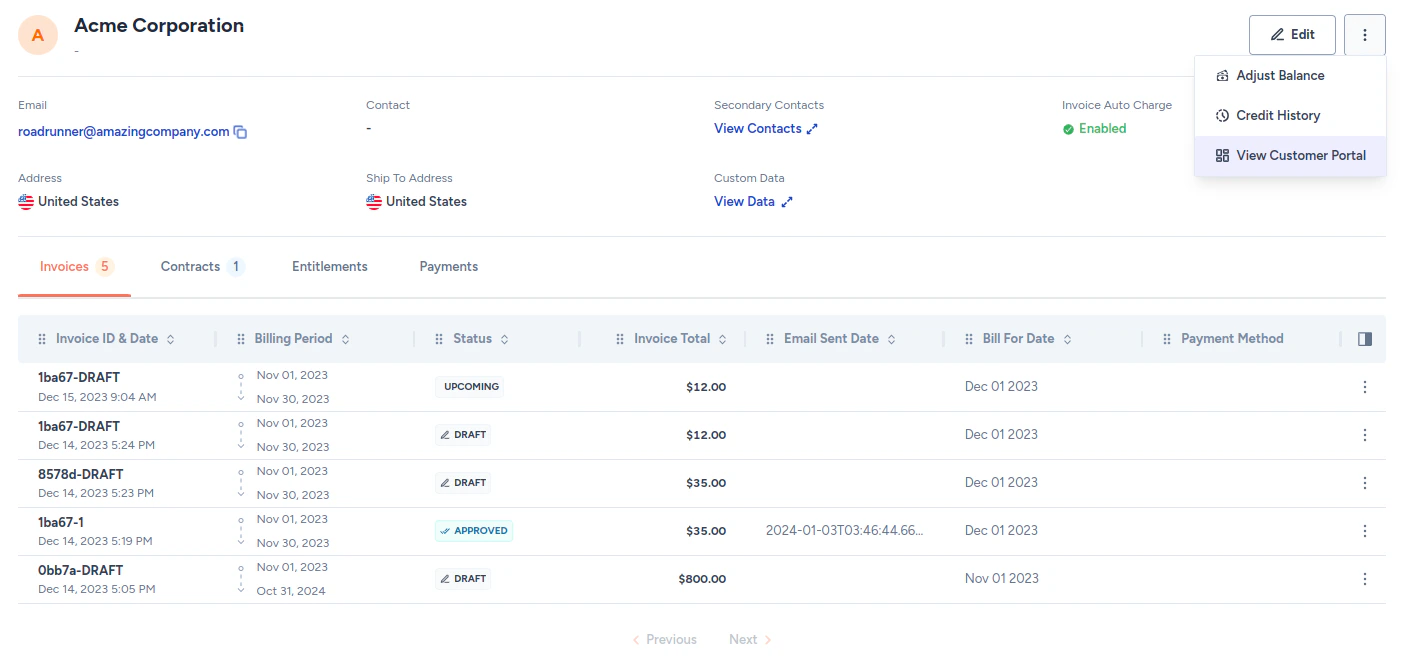
Preview the portal (admin)
To preview what a customer’s portal looks like without generating a session URL:- Navigate to Customers in the left sidebar.
- Click the customer you want to preview.
- Click the kebab menu in the top-right of the customer page.
- Select View Customer Portal.
Create customer session
Generate a session URL to redirect or embed the portal for a customer.